
Customer Settings
The Customer Settings section allows you to define customer-specific settings. Specifically, you can change some payment settings and notification preferences.
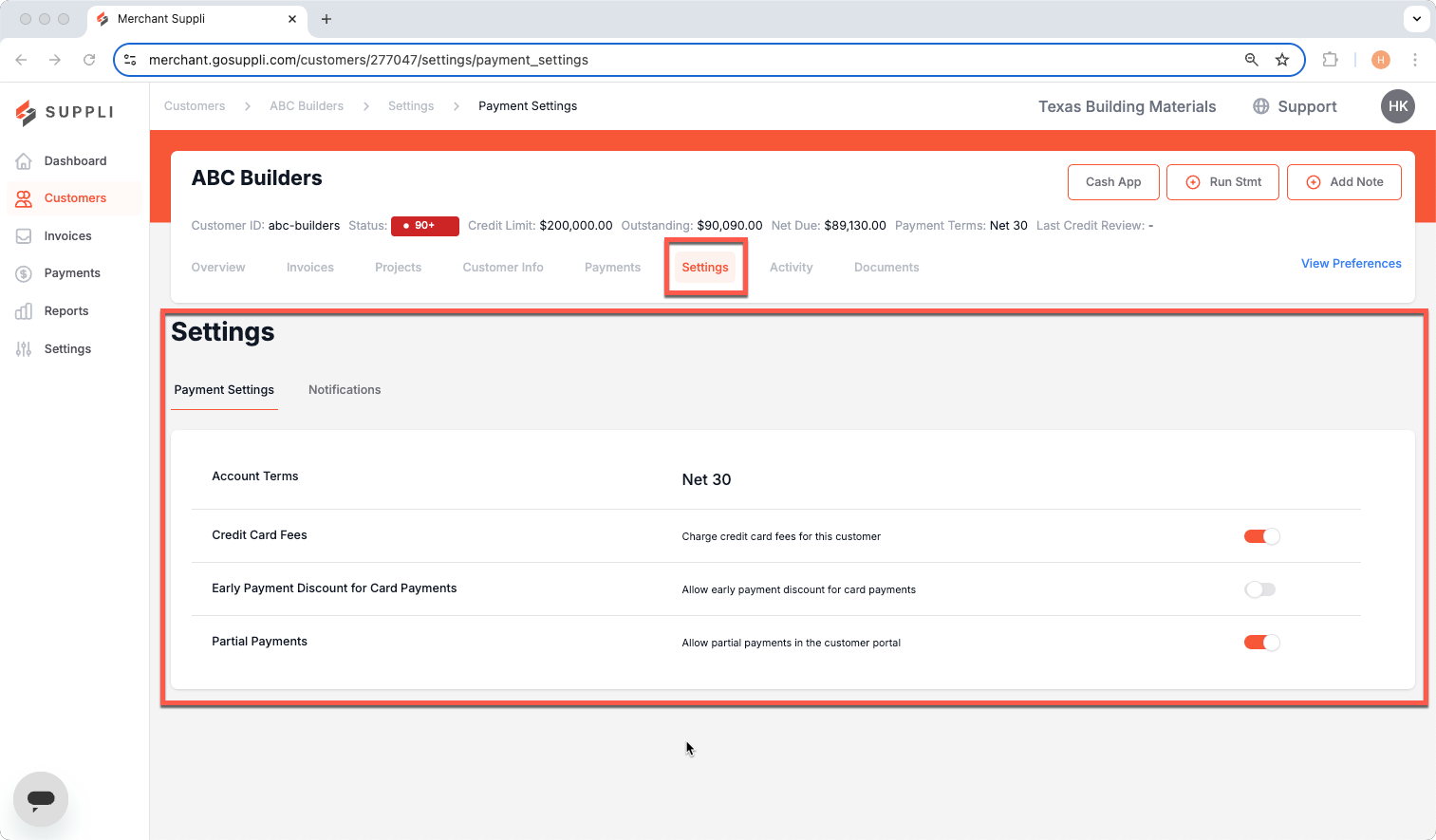
Default Customer Settings
By default, the Customer Settings (both payments and notifications) will match the general settings found in the Settings section. Changing the customer-specific payment settings overrides the general settings.
Payment Settings
This article relates to setting payment settings for a specific customer. If you would like to adjust the payment settings for all your customers, please click here.
Account Terms: Imported from the ERP
Credit Card Fees: You can toggle this on to charge credit card fees for the customer
Early Payment Discount for Card Payments: You can toggle this on to allow for early payment discounts to apply for card payments (in addition to ACH)
Partial Payments: You can toggle this on to allow customers to make partial payments on invoices rather than requiring full payments on all invoices.
Please note that these settings should match those in your ERP/invoicing system and reflect the terms you agreed to with your customer.
Notifications
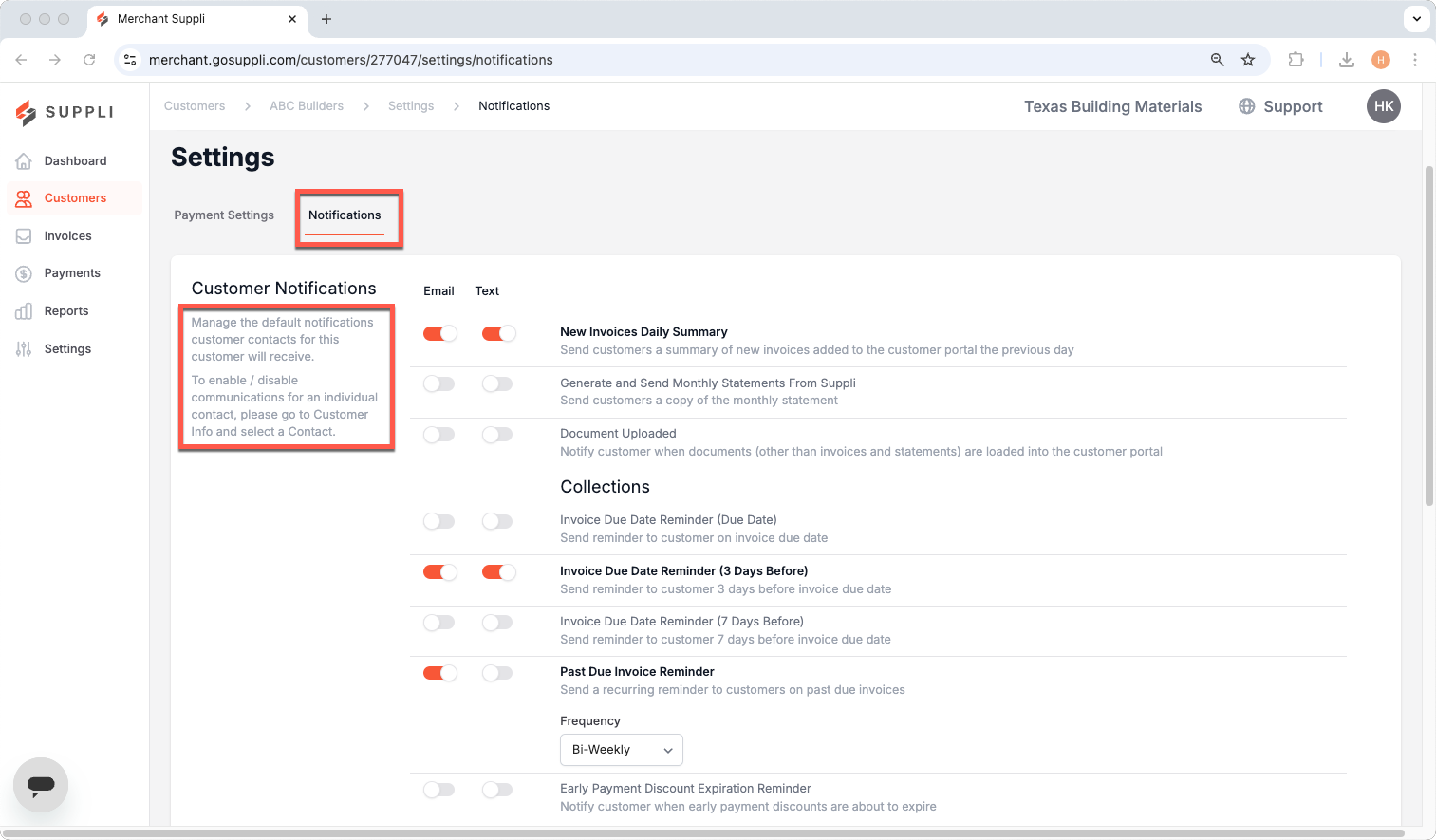
There are three categories of email and text notifications that can be adjusted at the customer level: General, Collections, and Transactional. By default, these notifications apply to all customer contacts at that company. You can set specific notification settings for individual contacts by going to the Company Contacts within the Customer Info page and clicking the blue edit pencil next to the contact.
General
New Invoices Daily Summary: Sends customer contacts a summary of new invoices added to the customer portal from the previous day
Generate and Send Monthly Statements From Suppli: Sends customer contacts a copy of the monthly statement
Document Uploaded: Notifies customer contacts when documents (other than invoices and statements) are loaded into the customer portal
Collections
Invoice Due Date Reminder (Due Date): This sends a reminder to customer contacts that an invoice is due on its due date
Invoice Due Date Reminder (3 Days Before): This sends a reminder to customer contacts that an invoice is due 3 days prior to its due date
Invoice Due Date Reminder (7 Days Before): This sends a reminder to customer contacts that an invoice is due 7 days prior to its due date
Past Due Invoice Reminder: You can set recurring reminders to customer contacts about past due invoices. Use the Frequency drop-down to set the cadence of these reminders
Early Payment Discount Expiration Reminder: This notifies customer contacts when early payment discounts are about to expire
Transactional
Successful Payment (External Payment or Credits/Deposits): This notifies customer contacts when an invoice or deposit payment is entered through Suppli using those methods
Initiated ACH Payment: This notifies customer contacts when an ACH payment for an invoice or deposit is initiated
Voided Payment (Card or ACH): This notifies customer contacts when a successful payment made through Suppli using a card or ACH is voided
Voided Payment (External Payment or Credits/Deposits): This notifies customer contacts when an External Payment or Credit/Deposit is voided
Promise-to-Pay (P2P): This notifies customer contacts when a P2P has been created, updated, cancelled, or expired
Promise-to-Pay (P2P) Expiration Reminder: This notifies customer contacts one day before a P2P is set to expire
Autopay Enrolled: This notifies customer contacts when they have enrolled their account for autopay
Autopay Unenrolled: This notifies customer contacts when they have unenrolled their account from autopay
Expiring Payment Method Reminder: This notifies customer contacts when their payment method is expiring in the current month
Payment Method Saved: This notifies customer contacts when a new card or ACH payment method is added to their customer account
Payment Method Deleted: This notifies customer contacts when a saved card or ACH payment method is deleted from their customer account