
AR Automation - Payment Settings
In this section, you can adjust your company's payment settings for all your customers. The payment settings that can be adjusted include:
Credit Card Fee
Early Payment Discount for Card Payments
Lien Waiver Request
Credit Limit
Partial Payments
Customer Payment Terms
Include all invoices with expiring discounts in autopay
** PLEASE NOTE: To adjust a specific customer's Payment Terms, go to Customer Payments. **
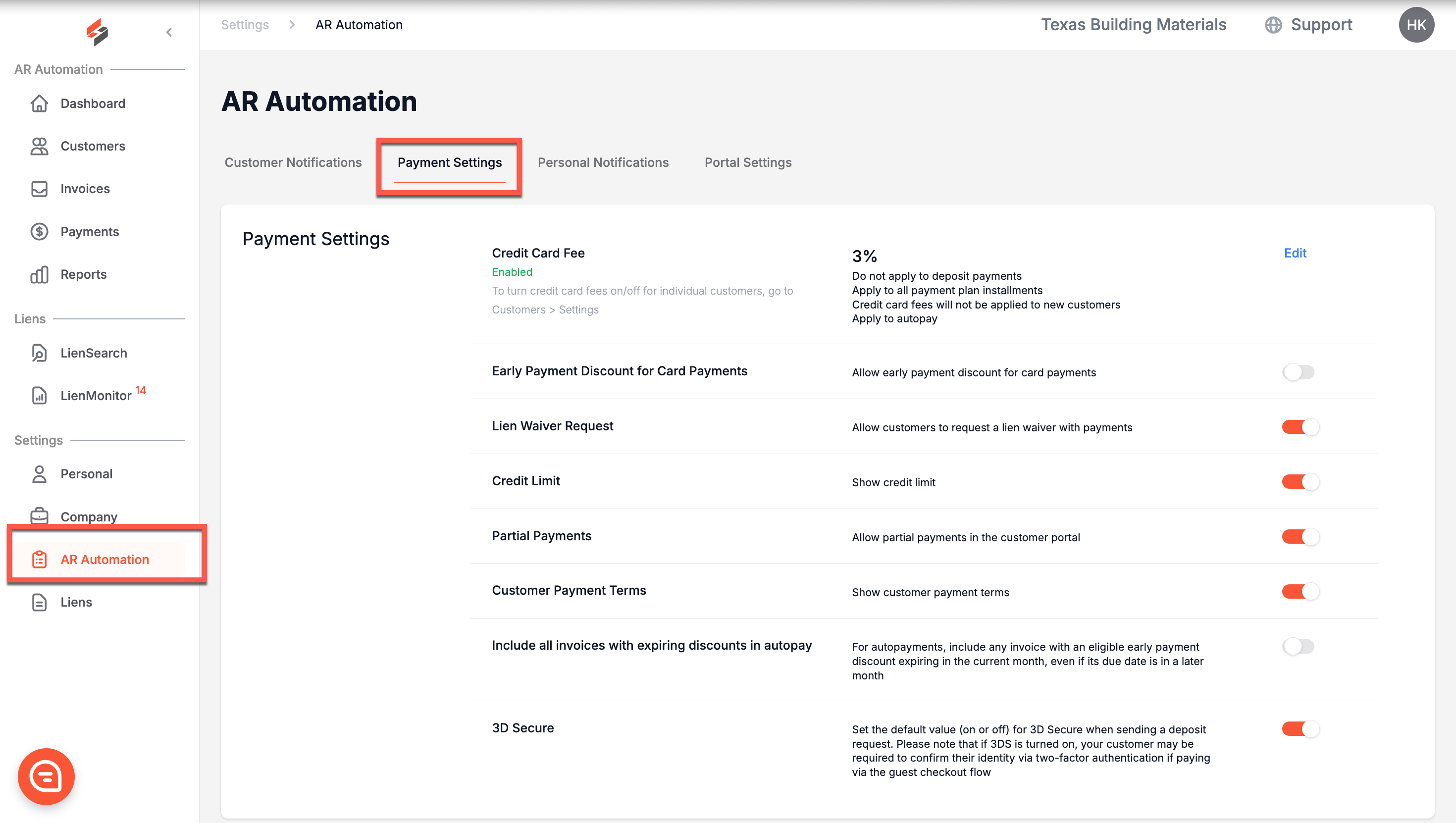
Credit Card Fee
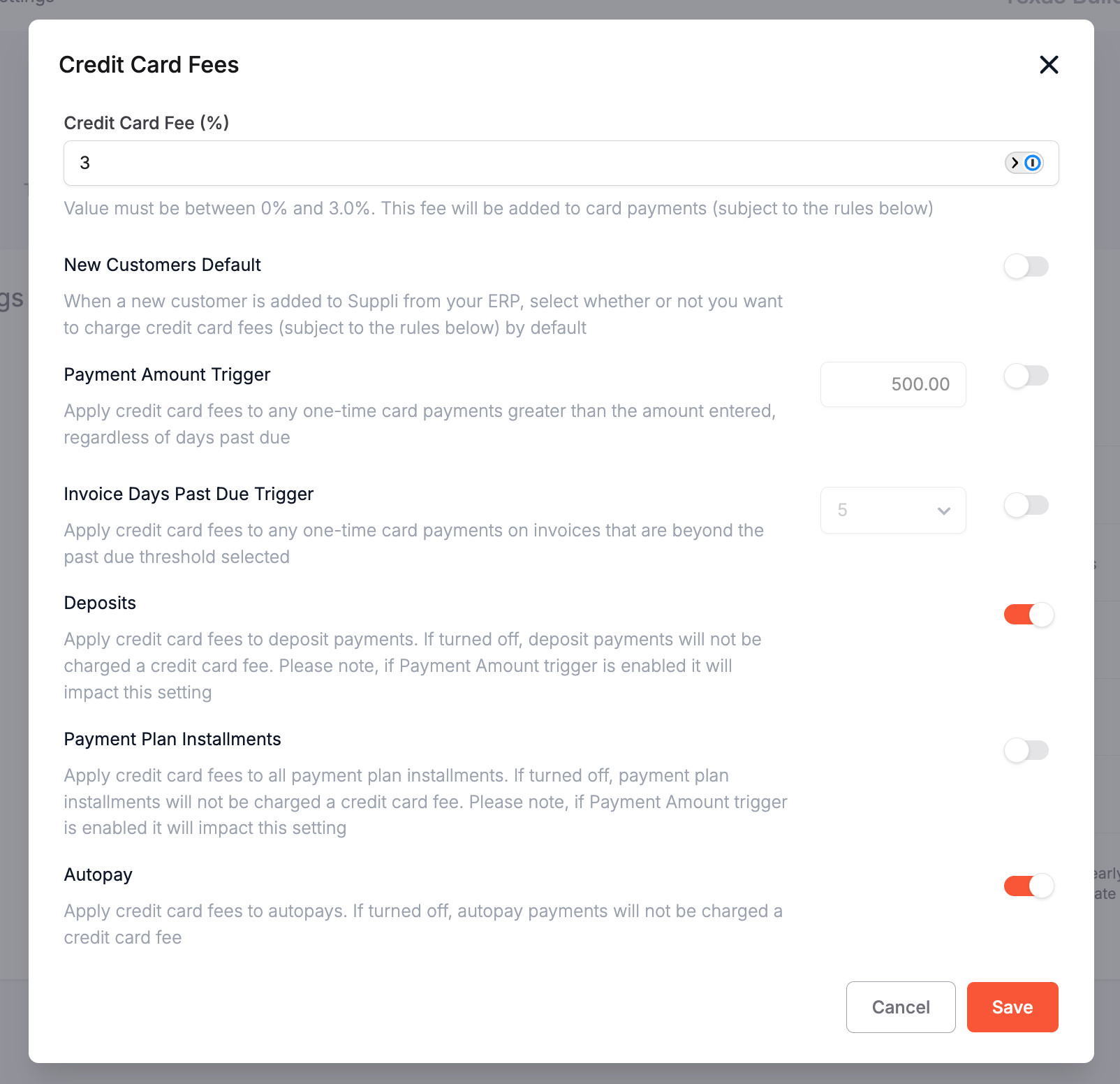
Suppli allows you to pass along fees to your customers to offset the payment processing costs associated with credit cards. Please note, these fees do not apply to debit cards. These fees can be dynamically set to adjust for certain conditions. By clicking "Edit" on the right-hand side of the Credit Card Fee row, a modal will pop up where you can adjust the following settings:
Credit Card Fee %: The fee amount to be added to card payments. This is subject to the other settings on this modal.
New Customers Default: When a new customer is added to Suppli from your ERP, they can default to be charged the credit card fee if this is toggled on.
Payment Amount Trigger: The credit card fee will be applied to any one-time payment greater than the amount entered, regardless of how overdue the payment is. This can be toggled on or off.
Invoice Days Past Due Trigger: The credit card fee will be applied to any one-time payment toward invoices that are beyond the past due threshold selected. This can be toggled on or off.
Deposits: If turned on, credit card fees will be applied to deposit payments. If turned off, there will be no credit card fee for a deposit payment, even if it exceeds the payment amount trigger or invoice days past due trigger.
Payment Plan Installments: Apply credit card fees to all payment plan installments. If turned off, there will be no credit card fee for a deposit payment, even if they exceed the payment amount trigger or invoice days past due trigger.
Autopay: If turned on, credit card fees will be applied to autopays. They will not be charged a fee if turned off, even if they exceed the payment amount trigger.
Credit Card Fees can only be set between 0% - 3.0%.
What My Customers Will See
If credit card fees are enabled, your customers will see the following message when making a payment:
"A convenience fee of 3.0% will be applied to this payment."Early Payment Discount for Card Payments
Early payment discounts are imported from the invoices in your ERP. You can toggle whether you want these enabled when your customer pays with a card. If not enabled, they will not receive the discount when paying with a card.
Lien Waiver Request
If turned on, this setting allows your customers to request a lien waiver when they are making a payment.
Credit Limit
You have the option of showing your customers their credit limit if this setting is turned on.
Partial Payments
You have the option to allow your customers to partially pay their invoices if this setting is turned on.
Customer Payment Terms
You have the option of showing your customers their payment terms if this setting is turned on.
Include all invoices with expiring discounts in autopay
If this is turned on, it will include any invoice with an eligible early payment discount expiring in the current month's autopayment, even if its due date is in a later month.
Deductions
See details here